iPhone Β· Multi-currency Β· Free 14-day trial

The expense tracker for life across borders.

Track spending and income in the currencies you actually use, keep trips and one-off projects separate from daily life, and stay on top of your days abroad. Built for expats, retirees abroad, digital nomads, and frequent travelers.

Free for 14 days. No subscription, no account, no cloud.

Free 14-day trial Multi-currency totals Trips kept separate Projects kept separate Visa & stay limits Private by design
How it works

Try the whole app free for 14 days.

Download NomadMetrics and start using every feature right away. No card up front, no account to create, and nothing to cancel. If it fits your life, unlock it once after the trial and keep using it without a subscription.

Download free
  1. 1
    Download freeGet it from the App Store and open it. No sign-up required.
  2. 2
    Use everything for 14 daysExplore every feature, add expenses, create trips and projects, and build your dashboard.
  3. 3
    Unlock once if it works for youContinue with a single one-time purchase. No recurring fees.
Your money crosses borders. You may earn in dollars, euros, or pounds and spend in baht, yen, dong, or pesos.
Your trips deserve their own space. A month in Japan should not blur the picture of what home really costs.
Your privacy still matters. Your financial life should stay easy to understand without requiring a cloud account or recurring fee.
Built for cross-border money

Know what your life really costs across currencies.

NomadMetrics was designed from the start for a life that spans countries and currencies. It is built around how money actually behaves when your home, bank, income, and travel do not share a border.

Pay local, total at home.

Enter what you paid in the local currency. NomadMetrics converts it so your totals stay in your home currency. No exchange math at the table, in the taxi, or at the till.

Home and trips stay separate.

Track Daily Living apart from Hanoi, Lisbon, Tokyo, or wherever's next. Each trip gets its own cap, map, report, and history.

Projects for the expenses that deserve their own space.

A renovation, house build, vehicle purchase, medical bill, or move should not distort your normal monthly spending. Give the project its own categories and an optional budget, view the breakdown as bars or a pie chart, attach up to 3 photos to each expense, and export a PDF report with receipt photos included.

Visa and stay limits, at a glance.

See how many days you have spent in a country or country group, add missing days manually, and set the limit that matters to you. Use the one-tap Schengen preset, track rolling windows such as 90 days within 180, and add an optional visa-expiry countdown. It is a planning estimate based on the days you have tracked in the app, not visa or legal advice.

A dashboard built around you.

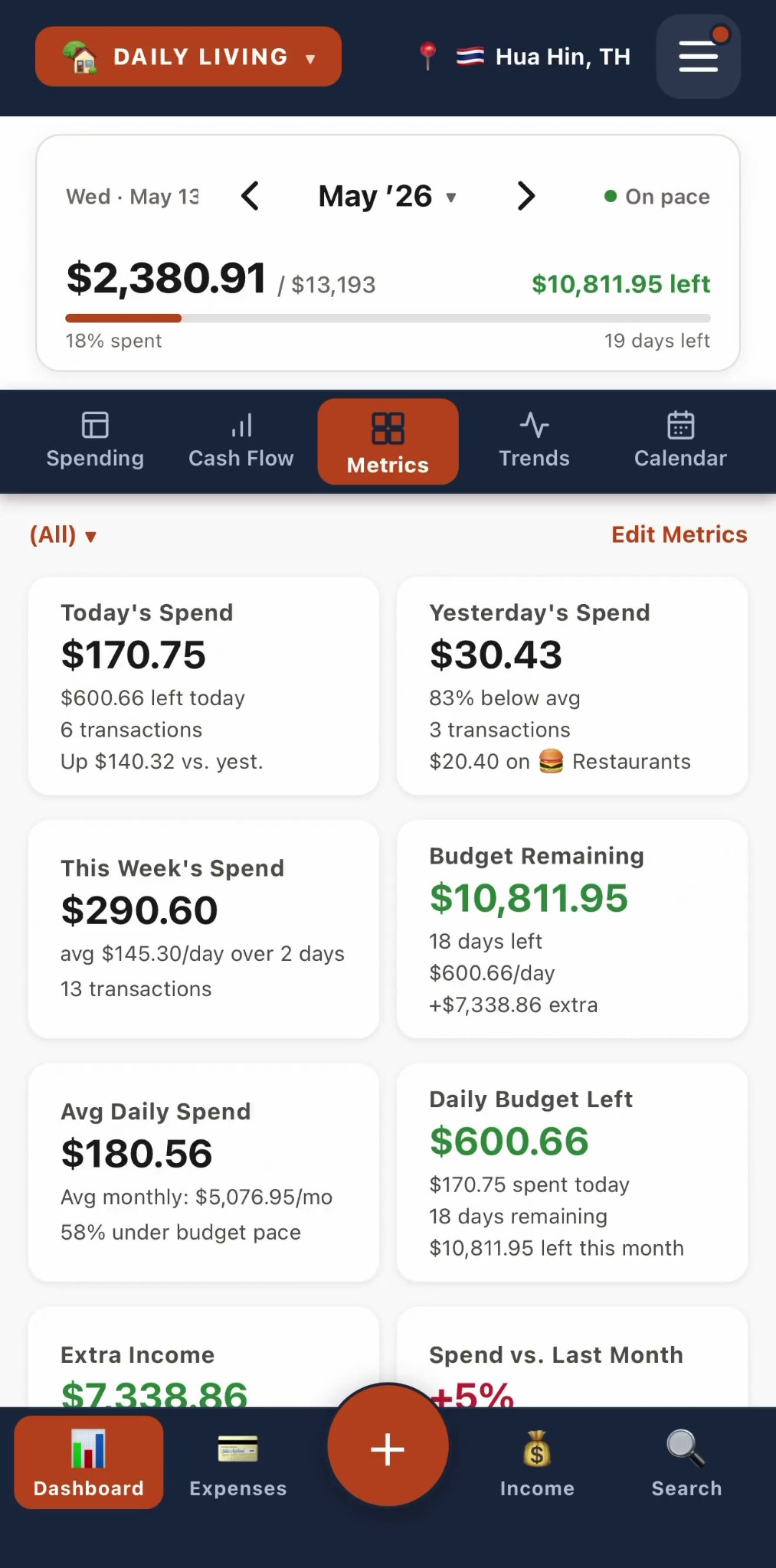
Choose the numbers you care about, daily spend, budget left, income, savings rate, top category, trends, then drag them into the order you want.

Income beside spending.

Pensions, salary, freelance, transfers, rent, dividends. Track what comes in next to what goes out, so your real cash flow sits in one place.

Maps and reports, on your terms.

Optional location tags show where your money went. Leave them off if you prefer. Export reports and CSV files whenever you want them.

No account. No subscription.

Your data stays on your iPhone unless you export it. No login, no cloud, no ad tracking, and no recurring fees.

Find the place by name.

Tag a transaction with where it happened, the cafΓ©, the market, the hotel, by searching the name. It's optional, and only the words you type are ever sent, never your spending.

Bring your history with you.

Coming from another app or a spreadsheet? Import a CSV and match its columns to NomadMetrics in a few taps, so your past months come along for the ride.

Keep the receipt, not the clutter.

Attach a photo to any expense for your own records. No scanning, no AI reading it, just your receipt stored privately on your iPhone.

Who it is for

Not just digital nomads.

If your financial life does not fit inside one country, one currency, or one tidy monthly budget, it was built for you.

Retirees abroad

Live local, plan in your home currency.

Track daily costs in baht or pesos while keeping a clear view of what retirement really costs in dollars, euros, or pounds.

Remote workers

Earn in one currency, spend in another.

Follow income and spending across borders without forcing your life into a one-country budget.

Frequent travelers

Keep trips from skewing your baseline.

Vacations, scouting trips, visa runs, and long stays stay separate from your normal monthly numbers.

Mixed-currency households

One home, more than one currency.

Track spending, income, categories, and travel even when your money spans several currencies and countries.

Actual app screens

Real screens, not mockups.

You should not have to imagine the product. These are actual NomadMetrics screens: your dashboard, multi-currency expenses, trips, maps, cash flow, Projects, and Days by Country.

NomadMetrics dashboard with customizable metric cards

Your dashboard

Pick and reorder the cards that matter most: today, this week, budget left, top spending, income, and more.

NomadMetrics expense list showing local currency and home currency amounts

Multi-currency lists

See the local amount and the home-currency total together, with trip labels and categories kept clean.

NomadMetrics trips screen showing Daily Living, Hanoi, Lisbon, and Tokyo

Trip buckets

Daily Living, Hanoi, Lisbon, Tokyo, or wherever's next. Each place stands on its own.

NomadMetrics global map showing expense clusters across Southeast Asia

Optional maps

Off by default. Turn on location tagging to see your travel spending plotted by place.

NomadMetrics cash flow screen showing income, expenses, and savings rate

Cash flow at a glance

Income, expenses, extra income, savings rate, and how the month moved, without opening a spreadsheet.

NomadMetrics project screen showing a house build with budget and category breakdown

Projects for one-off spending

Track a renovation, house build, vehicle purchase, medical bill, or other major expense in its own space, with categories, an optional budget, photo attachments, and a PDF report.

NomadMetrics Days by Country screen showing days tracked and stay limits per country

Days by Country and stay limits

Keep an eye on days used and days remaining for a country or group of countries, with a Schengen preset and an optional visa-expiry countdown. Estimates are based on the days you track.

Light or dark

It looks just as good in the dark.

NomadMetrics follows your iPhone's appearance, or you can lock it to light or dark. Same fast entry, same clear numbers, easier on the eyes at night.

NomadMetrics dashboard metric cards shown in dark mode

Metrics, at a glance

NomadMetrics cash flow chart shown in dark mode

Cash flow, six months

Privacy by design

Your spending stays on your device.

No account. No cloud database. No ad tracking. Your expenses, income, trips, budgets, categories, and notes live on your iPhone unless you export them yourself.

βœ“ No login or account creation required
βœ“ Optional location tagging is off by default
βœ“ Manual backup and CSV export stay under your control
Cloud account0
Subscription0
Data sold0
Why it feels different

Built around the way cross-border life actually works.

Most expense trackers

  • Γ—Assume one country, one currency, and one simple monthly budget.
  • Γ—Blend normal life and travel into one noisy spending picture.
  • Γ—Push accounts, cloud sync, subscriptions, or automated guesses.

NomadMetrics

  • βœ“Designed for people whose financial life crosses borders.
  • βœ“Separates home-base spending from trips and long-stay travel.
  • βœ“Free to try for 14 days, then yours with no subscription.

Why I built it.

After retiring and moving to Thailand, I got tired of expense trackers that did not fit the way my wife and I actually live. We spend in different currencies, travel often, separate trips from daily life, and care more about clear numbers than gimmicks.

I wanted fast manual entry, real multi-currency tracking, separate trips, income beside expenses, and a dashboard I could arrange around the numbers that actually matter to me.

So I built NomadMetrics around the financial life I was living, not the one most budgeting apps assume.

Dean Prieto, Founder

Before you download

Quick answers.

Is NomadMetrics only for travelers?

No. It works for normal monthly spending too. The difference is that it handles multi-currency life, income, and separate trips without making your daily budget messy.

Does it connect to my bank or scan receipts?

No. NomadMetrics is intentionally manual. That keeps entry fast, private, and under your control. No bank login, no receipt scanning, no AI guessing what you bought.

Where is my data stored?

On your device. There is no NomadMetrics account or cloud database. You can export or back up your data manually whenever you want.

Is location tracking required?

No. Location tagging is optional and off by default. It is only used when you decide to turn it on and map transactions by place.

Is there a subscription?

No, never. The app is free for 14 days. After the trial, a one-time unlock keeps full access, with no recurring fees.

What happens after the 14-day trial?

Your data stays exactly where it is. The app switches to read-only until you unlock it with a single one-time purchase, so you keep everything you logged. No subscription.

Can it handle a large one-off project such as a renovation or house build?

Yes. Projects keeps major one-off spending separate from your everyday numbers. Create project-specific categories, set an optional total budget, attach up to 3 photos to each expense, and export a PDF report with receipt photos included.

Can it help track visa or stay limits?

Yes. Add a custom limit for a country or country group, or use the one-tap Schengen preset. NomadMetrics shows your days used and days remaining based on the days you have tracked, including days you add manually. You can also add an optional visa-expiry countdown. It is a planning estimate, not visa or legal advice.

Can I bring my data over from another app?

Yes. Import a CSV and match its columns to NomadMetrics in a few taps. It also flags likely duplicates, so you do not double-count what you already had.

What about Android?

iPhone is first. Android is being evaluated based on demand. You can join the Android release list at the bottom of this page.

Read the full help guide

Ready to make cross-border spending easier to understand?

Try NomadMetrics free for 14 days on iPhone. Track spending and income across currencies, keep trips and one-off projects separate, and stay on top of your days abroad. No account, no cloud database, no subscription.

Download free

Android user? Join the Android release list.

Download free